Overview
Role: Solo UX Researcher and UX Designer (End to End: Research planning, Competitive analysis, User interviews, Persona creation, User journeys, Wireframing, Prototyping, Usability testing, Visual design)
Tools: Figma, Wireframing, Prototyping
Timeline: 4 weeks
Goal: Help gallery visitors easily find and explore information about artists and artworks.
Problem
Visitors to art galleries often struggle to find clear, contextual information about artists and artworks. Existing tools can feel overwhelming or hard to navigate, and in-gallery signage is not accessible after they end their visit.
Challenge: Design an app that presents information intuitively, clearly, and engagingly, enhancing the visitor experience.
Research & Insights
Research Methods
Methods:
Competitive analysis of 4 museum/gallery apps
4 in-person user interviews
Observation of in-gallery behavior
Research Notes:
Initial outreach to gallery owners via email resulted in low response rates, so I adapted my research approach to include opportunistic, in-person interviews with gallery staff, owners, and gallery attendees during gallery visits.
Interviews took place on a cold weekend afternoon, which limited overall foot traffic and participant diversity. While this constrained the sample size, it allowed for longer, more in-depth conversations with gallery staff and surfaced meaningful qualitative insights.
This research was conducted as early-stage discovery and is treated as directional rather than representative. Several previously unrecognized pain points emerged during interviews, directly informing the design direction. Research limitations were considered throughout the process, with additional attention given to designing for broader accessibility and diverse user needs beyond the immediate participant group.
Research Participants: Participants were selected to represent both primary user groups (gallery visitors) and key stakeholders (artists and gallery managers).
6 participants total: 2 gallery owners/managers, 3 gallery visitors,1 exhibiting artist
Ages: 31–72
Experience levels: Ranged from no formal art knowledge to practicing artists
Gallery involvement: Included casual visitors, professional artists, and gallery leadership
Key Insights: Users want quick, digestible info about artworks and artists. Clear visual hierarchy improves comprehension. Research showed the desire to know methodology, not simply artist bio information. The possibilities for future app expansion include: interactive features for users, such as favorites and a map feature for users to find other galleries in the area.
A User Persona
Holly, 55
Hometown: Colorado Springs
Occupation: School Board Member
Goal
To know more about the processes that produce the art that she sees.
Frustration
Having to ask about the processes if there is no information posted about them in the gallery. Also, gallery staff don't always know the answer anyway (since they can often be volunteers, or just not knowledgeable about that particular artist/work.)
User Journey
Before App
Visitor enters gallery - Visitor becomes curious about a work of art - Visitor looks around for a relevant wall plaque - Visitor reads wall plaque, but does not get all the desired information.
With App
Visitor enters gallery - Visitor becomes curious about a work of art - Visitor scans QR code next to artwork with their phone - Visitor is taken to a page about the work of Art - Visitor explores information about the art and artist at will - Visitor explores even more information on the website at home.
Key findings & their influence on the design
Finding #1
Gallery owners felt strongly that a visitor's interaction with information about the art and artist increased engagement and appreciation.
"I only deal in authentic art. So I only deal in original. I think it's important for [visitors] to know how much time, how many decades most of these people have put into doing what they do and why the price tag is what it is." - Kathy, Owner, Lucky Pig Gallery
Influence:
Overall aesthetic would be kept simple and warm, and user flow kept intuitive. The overall goal would be to make the app friendly and approachable, while still sophisticated and informative.
Finding #2
Gallery visitors want a variety of information about the art and artist, including information about the artistic process. They aren't ONLY interested in the artist's biography.
"I'm just really drawn to what they're producing, and as so I assume it's a reflection of them. But like it doesn't matter to me as much as what they're producing." - Holly, gallery visitor
Influence:
Offerings expanded from just an Artist Bio. Artistic Process and access to other works by the Artist in the Gallery were added.
Finding #3
It would be useful to both visitors and gallery owners if information was available both inside the gallery and from home. One of my interviewees was actually an artist manning a gallery for an owner who was out of town. She expressed frustration with not being able to talk to everyone or answer every question when the gallery is short-staffed.
Influence:
A stand-alone app was then converted into a responsive website as well. It was kept simple and friendly, with a common branding apparent between the two.
Design Process
Ideation & Sketching
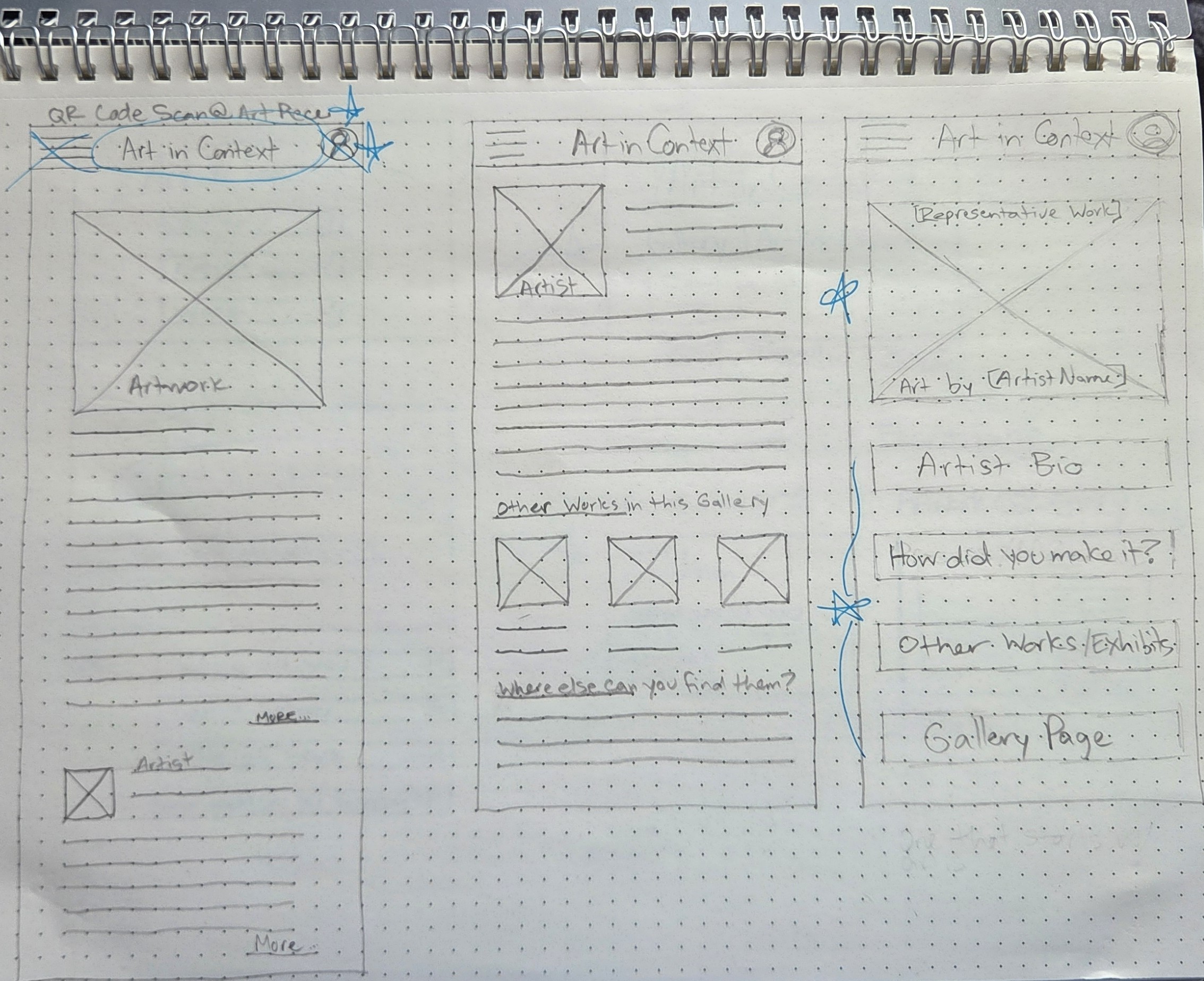
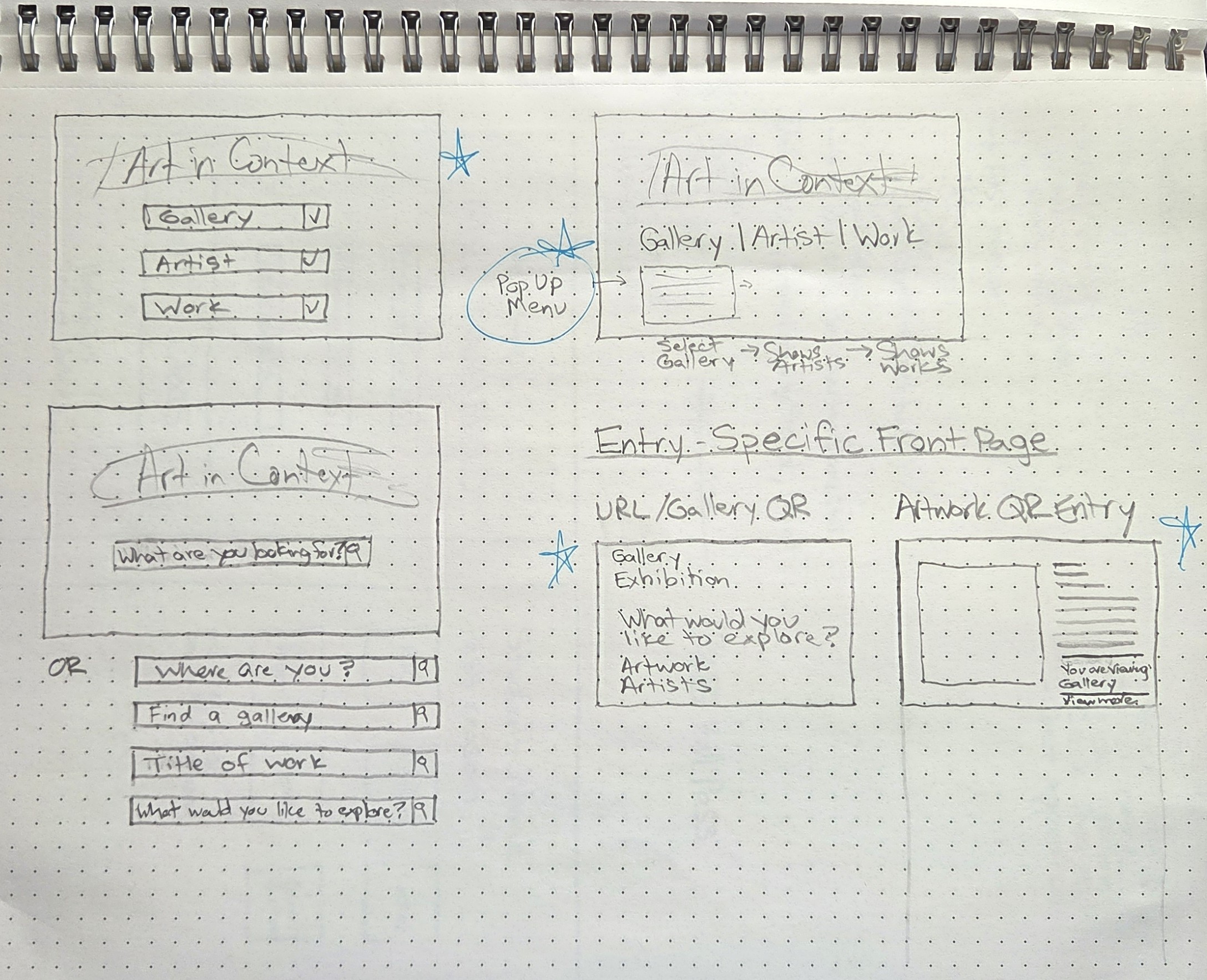
Layout options were explored using sketches. The focus was on organizing and simplifying content for intuitive navigation.
App Sketches
Responsive Website Sketches
Wireframes
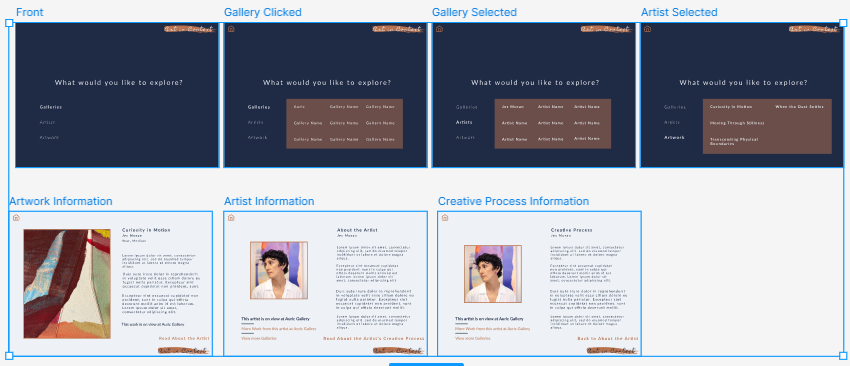
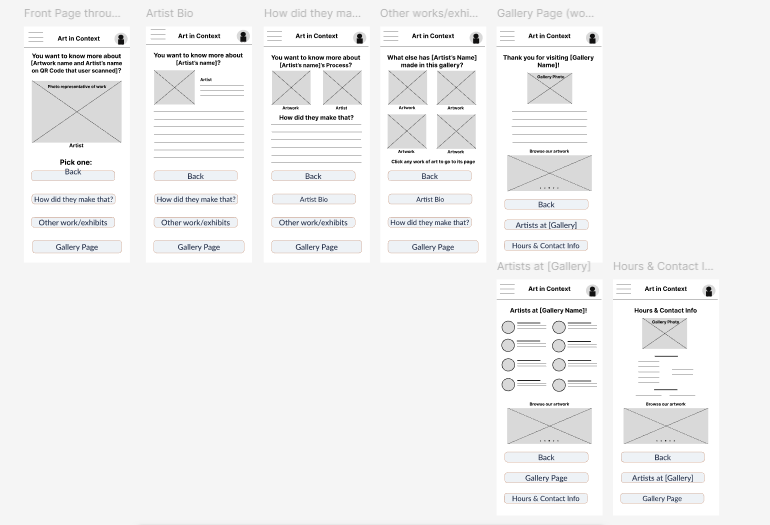
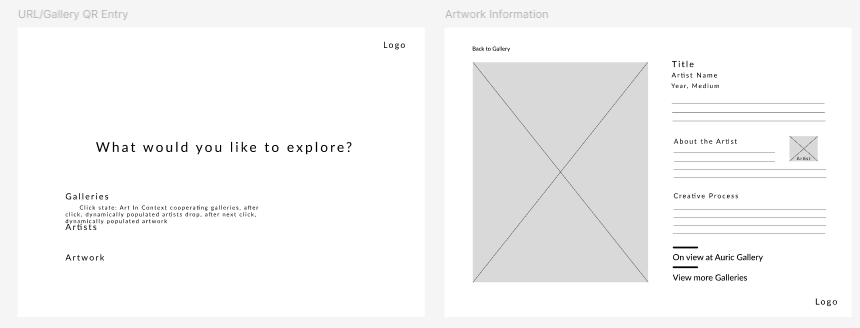
Wireframes on Figma were used to test hierarchy and user flow. Navigation placement and content grouping are simple to rearrange in this step for optimization. It also allowed me to more accurately assess what could be better streamlined.
App Wireframes
Responsive Website Wireframes
Usability Testing
The goal was to validate that the user flow worked. I had 2 users test out the wireframes. Neither user ran into any usability issues, and commented that the app was simple and intuitive. This told me to keep the flow as-is and focus on the aesthetics without compromising any of what was already working.
Outcome: During usability testing, 2 out of 2 participants successfully located artist information and artwork process details without assistance.
High Fidelity Mockups
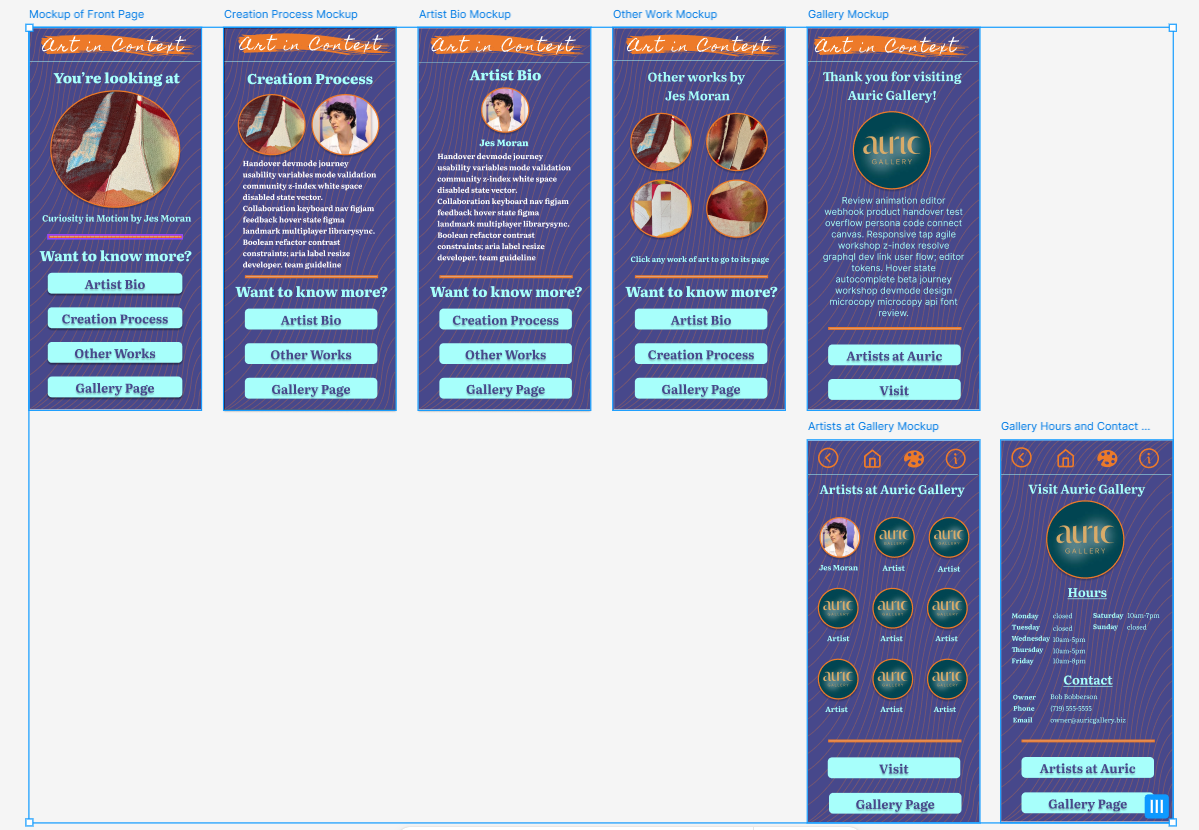
This is where I enjoy myself the most. I take pride in making things look really good and work really well. The creativity of this step often inspires more ideas, whether small tweaks for aesthetics or even a change to a completely different project! For "Art in Context", I began designing the app first. I created a color scheme and a simple logo before I applied color and typography to the layouts. I ensured accessibility throughout, and checked consistency and clarity across different types of screens. I refined the layout based on usability feedback.
My goal was to let the artwork be the star, and to let everything else look sophisticated and clean. I also wanted the app and website to be unique experiences while still being recognizable as a common brand. Since they were being used in unique circumstances - the app would be used in gallery, while the website would likely be used at home as an extension of the visit - I still wanted to give them their own feel.
My first iteration had a brighter version of the color palette and more of a playful background.
Initial App Mockups
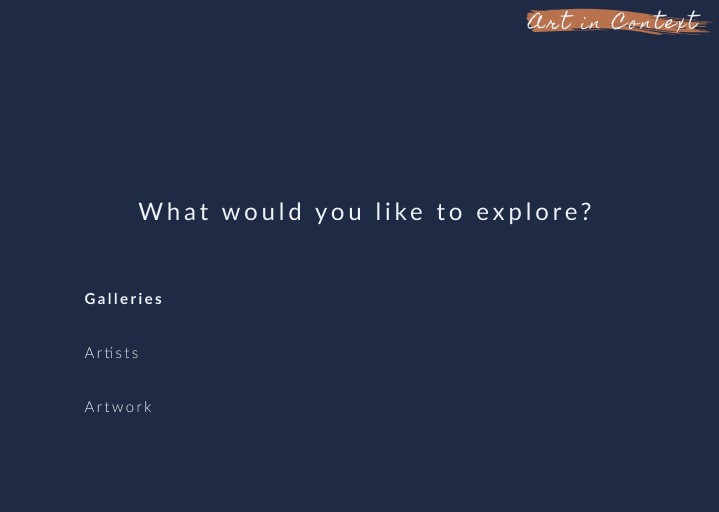
After some reflection, I felt that I needed to tone it down toward the understated. I tweaked the color scheme toward deeper and richer tones and cleaned up the background. I decided to make the "landing page" (accessed through a QR code in-gallery next to the artwork the user is viewing) very distinct, thus the darker background. I later decided to use this darker version for the entry page of the website as well, for continuity and familiarity.
App Mockups
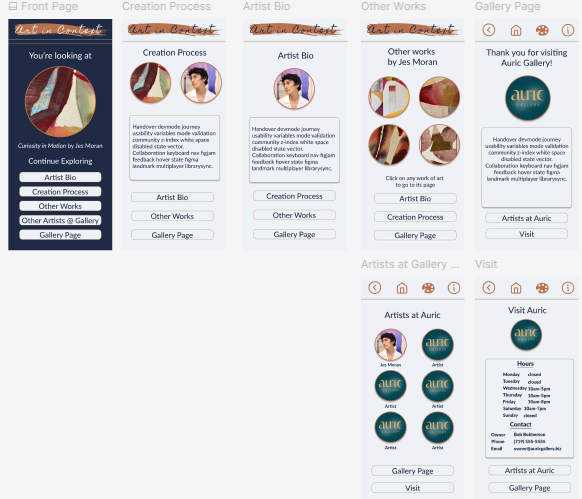
App Prototype Example
Web Mockups
Outcome
The final interactive prototypes allow users to access artwork information, including artistic process and biographical information, increasing visitor engagement with the artwork. "Art in Context" allows users to navigate to other works in the gallery by that artist, also increasing engagement with the artist's larger body of work. The visitor can access information about the gallery, as well. While I first sought to connect the in-gallery visitor more with the art they were looking at, I expanded the idea to encompass a responsive website side of the experience as well. Doing this, I expanded the usability and points of contact with a wider variety of users.
Reflection
Key takeaways:
I began this project thinking that users would all want to know more about the artists themselves: biographical information and the like. Research indicated that they were also very interested in the artistic process and methodology, which meant a pivot and expansion from my initial scope.
Looking Ahead
Depending on client goals and interest, these are future possibilities for the app:
1. Expanding into the gallery-management side to help owners and managers to keep information up-to-date for app users.
2. Add features like maps and favorites to enhance the user experience.
3. Include features that can connect galleries with events in their communities with facilities like co-ops and schools.