
Designing Before I Knew It Was UX
For 13 years, I worked as an art educator — a role that required far more than teaching techniques or managing a classroom. Every day, I was observing users, identifying problems, designing solutions, testing ideas, and iterating based on feedback. Before I knew the language of UX design, I was already practicing many of the same principles: understanding people’s needs, creating intuitive experiences, and improving systems through observation and iteration.
My classroom was my first design space.
Understanding Users Through Observation and Research
Great design begins with understanding the people who will use it.As a teacher, I constantly gathered information through observation, conversations, surveys, assessments, and informal feedback. I learned to recognize when a student was struggling, identify barriers preventing success, and adjust the experience to better meet their needs.Whether redesigning a lesson, creating a new resource, or developing a classroom process, I approached problems by asking:
Who is this for? What challenges are they experiencing? How can I create a better experience?
These same questions now guide my UX design process.
Case Study: Building a Digital Portfolio System
The Problem
Students needed a way to document, organize, and reflect on their artwork over time. Paper-based documentation was difficult to maintain, easy to lose, and did not allow students to clearly see their own growth.
The Design Process
I created a digital portfolio system that allowed students to collect artwork, document their creative process, and reflect on their learning.
The process required me to:
-Understand student needs and technology access
- Design a structure that was easy for students to navigate
- Create clear instructions and visual organizationTest the system with students
- Refine the experience based on challenges and feedback
UX Connection
This experience mirrors UX work by combining:
User Research → Information Architecture → Interface Design → Testing → Iteration
The goal was not simply creating a digital file system. The goal was creating an experience that helped students understand and communicate their own growth.
Case Study: Designing a Ceramics Curriculum
The Problem
Learning ceramics requires students to understand complex processes, develop technical skills, and build confidence through experimentation. A successful curriculum needed to support beginners while allowing experienced students to continue growing.
The Design Process
I designed a scaffolded ceramics curriculum that broke complex skills into manageable steps while allowing students opportunities for creativity and exploration.
I considered:
- What information students needed at each stage
- Where confusion or frustration commonly occurred
- How visual examples could improve understanding
- How feedback could guide improvement
Through student work, observations, and critiques, I continuously refined lessons and processes.
UX Connection
Curriculum design is experience design.
I was creating a learning journey by considering:
- User goals
- Cognitive load
- Accessibility
- Feedback loops
- Progressive complexity
Case Study: School-Wide Poster Redesign
The Problem
A new school spirit and expectations Poster campaign was drafted by teachers with an excellent message, but childish style in the design elements. If you know any middle schoolers, you know that they will completely ignore something that seems too "little kid" focused for them, no matter how valuable the content is. I volunteered to redesign the posters to maximize the efficacy of the message.
The Design Process
I redesigned posters with a focus on:
- Modern and age-appropriate aesthetic
- Clear visual hierarchy
- Readability
- Consistent branding
- Faster information recognition
By considering the target demographic and redesigning with them in mind, the information was more likely to be recieved and taken seriously. Here is the final design, specified for my Art classroom:
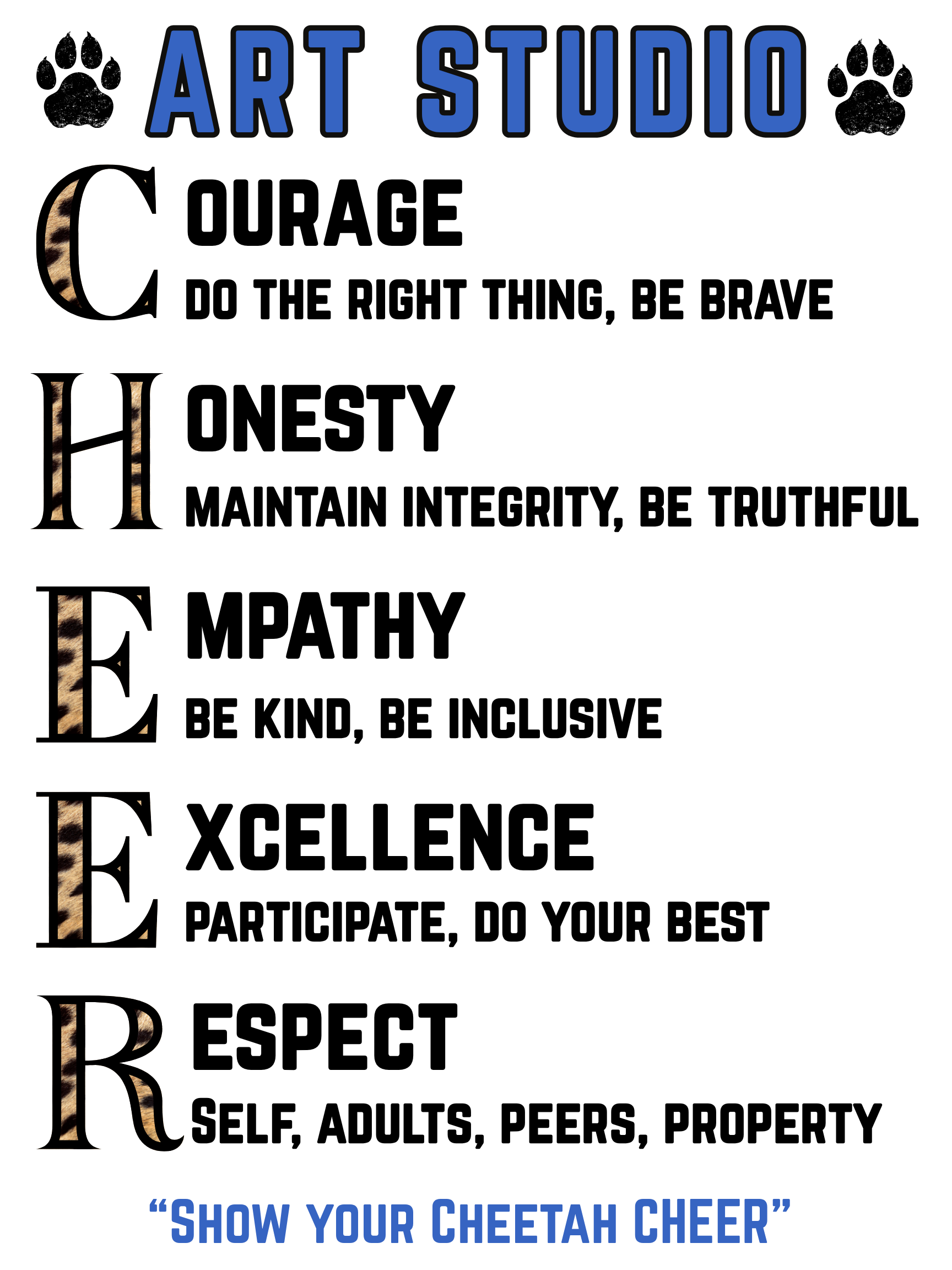
UX Connection
Visual design is not only about making something attractive. It is about helping people find, understand, and act on information. However, if the target user is less likely to engage with the information because the design is not attractive to them, then your campaign has still failed.
Designing Through Feedback and Iteration
Teacher Evaluations as User Feedback
Throughout my teaching career, I regularly used feedback to improve my practice through formal evaluations, student outcomes, observations, and reflection.
Rather than viewing feedback as a final judgment, I treated it as data:
*What is working?
*What is creating friction?
*What changes would improve the experience?
This mindset directly connects to UX iteration.
The best solutions are rarely perfect on the first attempt. They improve through testing, feedback, and refinement.
The Connection Between Teaching and UX
Teaching and UX design share the same foundation:
Understanding people.
Both require empathy, problem solving, communication, creativity, and the ability to adapt based on real human needs.
My transition into UX is not a change from designing experiences — it is a continuation of the work I have been doing throughout my career.
The tools are different. The mindset is the same.